FRIDGE SCANNER APP
A fridge scanner that keeps you in control
Use FridgeFox as a mobile-first fridge scanner: photograph a shelf, review detected ingredients, and choose what belongs in your pantry.
A fridge scanner app uses a phone photo to suggest the ingredients visible in a fridge, freezer, pantry, or on a counter. FridgeFox shows the detections for review before saving anything, so you can correct names, skip mistakes, and keep the pantry useful rather than blindly importing an image.
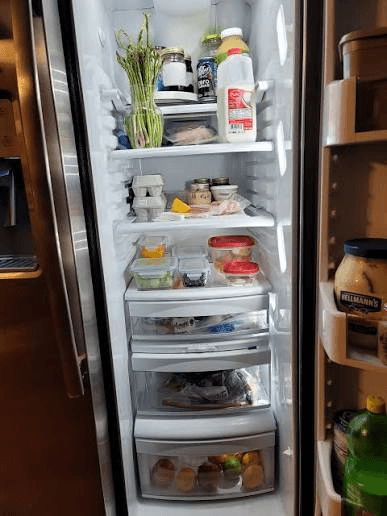
How the FridgeFox scan works
Open the scan flow on your phone and take one clear photo of the shelf or surface you want to update. FridgeFox sends the image for visual review, then returns named ingredients with categories and confidence information.
The important step is the review screen. You can keep only the items that are genuinely visible, adjust a name or category, and leave uncertain items out. The scan is a shortcut for data entry, not a replacement for your judgment.
Photos that produce a more useful result
A bright, close image with the fridge door open gives the scanner more context. Photograph one area at a time when shelves overlap, labels are turned away, or containers hide one another.
For packaged food, the result may be a broad category rather than a precise product. Add the exact name, quantity, or expiry date manually when that detail matters to your household.
- Use the rear camera when possible.
- Keep the shelf and containers inside the frame.
- Avoid glare and very dark corners.
- Review every suggested ingredient before saving it.
What a fridge scanner cannot know from one photo
A photo cannot reliably confirm an item’s freshness, temperature history, allergy status, or exact expiry date. Packaging can also hide ingredients and several foods can look alike. FridgeFox therefore treats recognition as an editable starting point.
When food safety is involved, follow the label and local public-health guidance. Use the app to organize information, not to make a safety decision for you.
A calmer kitchen starts with one useful view