AI FRIDGE SCANNER
AI fridge scanner with human review built in
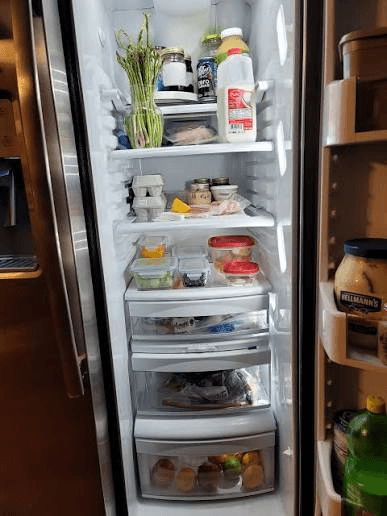
FridgeFox turns one clear fridge, pantry, or shelf photo into editable ingredient suggestions. You review names, categories, and uncertain detections before anything is saved. That review-first step makes the photo useful as a shortcut to a persistent pantry, without pretending that computer vision can identify hidden food, freshness, allergens, or exact quantities.
Responsive web app · Mobile and desktop browsers · Installable PWA where supported
THE REVIEWED WORKFLOW
From one photo to a useful pantry
- 01Take or upload a photo
Use a clear fridge, pantry, freezer, or shelf image.
- 02Review detections
Edit names, remove mistakes, and add missed ingredients.
- 03Save the pantry
Only accepted ingredients become persistent records.
- 04Add useful dates
Expiry fields are optional and entered by you.
- 05Compare recipes
See match percentages and missing ingredients.
What happens after you take a photo?
Open the private scan page, choose Take a photo or Choose from gallery, and submit one image under 10 MB. FridgeFox accepts JPG, PNG, WebP, HEIC, and HEIF through the current upload path.
The result is a review screen, not an automatic import. Keep useful detections, edit broad labels, remove mistakes, and manually add anything that was hidden or missed before saving the selected ingredients.
- Take a new rear-camera photo or choose an existing image.
- Review every suggested ingredient.
- Add missed items manually.
- Save only the ingredients you accept.
Why does FridgeFox require a review?
Food packages overlap, reflections hide labels, and similar ingredients can look alike. A visible review step lets the user resolve those ambiguities instead of quietly filling the pantry with guesses.
Confidence labels describe how certain the model appears to be; they are not guarantees. FridgeFox does not infer food safety, freshness, allergens, or expiry dates from the image.
How should you photograph a fridge for scanning?
Use good light, avoid strong reflections, and frame one shelf or area clearly. Move containers only when it is safe and practical, and keep labels or distinctive shapes visible.
The backend currently supports one image per scan. Photograph another shelf in a separate scan rather than expecting one wide photo to reveal food behind doors, drawers, or containers.
WORKFLOW COMPARISON
Photo-to-pantry workflow compared with manual entry
| Need | FridgeFox | Manual method |
|---|---|---|
| Initial input | Camera or gallery photo | Type every item |
| Accuracy control | Review and edit before save | User enters final value |
| Hidden items | Add manually after the scan | Add manually |
| Persistent inventory | Saved to the account pantry | Depends on the chosen list |
TRANSPARENT PRICING
Pro for one kitchen. Family for a shared household.
Pro costs €9.99 monthly or €99.99 yearly. Family costs €19.99 monthly or €199.99 yearly and supports one owner plus up to five members. There is no free application plan.
COMMON QUESTIONS
Questions before you choose
Can I upload a photo from my phone gallery?
Yes. The gallery input is separate from the camera input and has no capture attribute, so supported mobile browsers can open the photo library or file picker.
Does the scan save ingredients automatically?
No. You review, edit, select, and save the detections yourself.
Is FridgeFox a native iPhone or Android app?
FridgeFox is a responsive web app. You can use it in a modern mobile browser and install it as a PWA where the browser supports installation.
START WITH ONE REVIEWED PHOTO