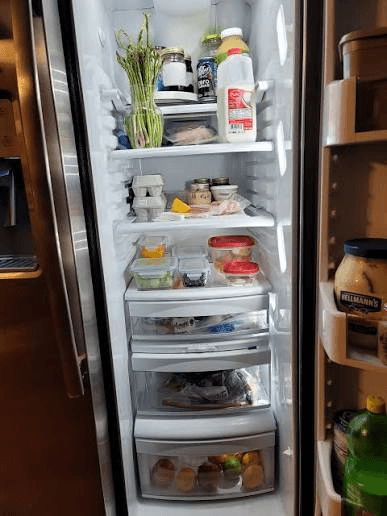
A fridge photo is a faster starting point, not a finished inventory. The useful work happens in the review: naming broad items, excluding false detections, and remembering what the camera could not see.
Key takeaways
- One area per photo.
- Good light and limited overlap.
- Review before save.
- Add hidden items manually.
1. Choose one area with a clear purpose
Start with the shelf, drawer, or door section that affects the next meal or shop. Remove visual clutter only when it is safe, and do not leave perishable food out while arranging a perfect picture.
FridgeFox currently processes one photo per scan. A focused image usually provides more usable detail than a distant whole-fridge shot.
2. Take a photo the model can inspect
Use good light, hold the phone steady, avoid glare, and keep labels or distinctive food shapes visible. A rear camera generally provides better detail than a front camera.
On mobile, choose Take a photo for the camera or Choose from gallery for an existing image. These are separate inputs so the gallery is not forced into a camera-only flow.
3. Review every detection before saving
Read each suggested name, compare it with the image, and use confidence wording only as a prompt to check. Edit a broad result, remove an incorrect item, and deselect anything that should not enter the pantry.
Do not assume that a plausible label is correct because it came from AI. The review is the control that turns recognition into usable inventory data.
4. Add what the photo could not see
Open drawers, check door shelves, and remember food behind opaque packages. Add those items manually or scan another clear area in a separate pass.
Quantities and dates are optional. Add them when they affect shopping, cooking, or expiry attention, not because every record needs to look complete.
5. Use and maintain the inventory
Open recipe matches and compare the ingredients you have with those still missing. After cooking, remove or update what changed so the next match is based on the current kitchen.
Run a short reset before shopping. A five-minute useful list is more defensible than a perfect inventory that nobody maintains.
- One area per photo.
- Good light and limited overlap.
- Review before save.
- Add hidden items manually.
- Update after cooking and before shopping.
What can a fridge photo not tell you?
A photo cannot establish temperature history, freshness, allergens, exact quantity, or a safe use-by decision. Packaging can hide food and similar ingredients can look alike.
Follow package labels and current local food-safety guidance. Use the app for organization and recipe discovery, not as a safety authority.
What are the limitations and exceptions?
This guide cannot inspect a specific food, package, storage temperature, household need, or medical context. Check labels and current local guidance, and treat FridgeFox scans and recipe matches as editable suggestions rather than safety, allergy, nutrition, or freshness decisions.
Sources and further reading
Food-storage and safety guidance changes by country and context. Use these authoritative sources for the decision in front of you.
See the FridgeFox testing methodology and corrections process for how product and source claims are reviewed.
A practical next step