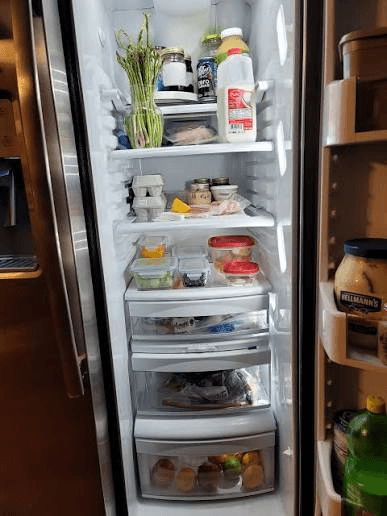
“AI fridge scanner” is used loosely. Some tools recognize food, some scan barcodes, and others scan recipe images rather than fridge contents. This comparison separates those input methods and treats an undocumented feature as unconfirmed rather than absent.
Key takeaways
- Use good light.
- Keep labels visible.
- Test camera and gallery separately.
- Try a mixed shelf and packaged products.
Comparison at a glance
| Criterion | FridgeFox | NoWaste | Samsung Food+ |
|---|---|---|---|
| Food photo input | Yes, camera or gallery | Photo recognition stated | Vision AI ingredient scan stated |
| Review before save | Yes, explicit review | Not detailed on source checked | Not detailed on source checked |
| Inventory model | Persistent single pantry | Fridge, freezer and pantry lists | Food List |
| Recipe connection | Match % and missing items | What-to-cook stated | Use It Up and suggestions |
| Price checked | From €9.99/mo | Not stated on page checked | $6.99/mo or $59.99/yr for Food+ |
What makes an AI fridge scanner useful?
Recognition alone is not enough. The scan should lead to an editable list, a clear save decision, and an inventory the user can maintain after food is moved or used.
FridgeFox makes the review step explicit. Users can edit names and categories, remove incorrect detections, and add hidden items manually. This reduces automation risk without claiming guaranteed accuracy.
Where is NoWaste stronger?
NoWaste’s official site describes photo recognition, barcode scanning, expiry tracking, and separate freezer, fridge, and pantry lists. That is broader inventory infrastructure than FridgeFox currently provides.
Choose NoWaste when separate locations or barcode capture are essential. Choose FridgeFox when the important differentiator is reviewed photo-to-pantry entry followed by transparent recipe matching.
Where is Samsung Food stronger?
Samsung Food positions itself around recipe saving, meal planning, shopping, and cooking. Its Food+ documentation adds Vision AI ingredient scanning, Use It Up recipe search, and tailored meal plans.
That breadth makes Samsung Food stronger for planning. FridgeFox is narrower and should not claim automatic weekly meal plans, connected appliances, or the same recipe ecosystem.
How accurate are photo scanners?
Accuracy depends on lighting, overlap, packaging, angle, and the kinds of food visible. A single percentage would be misleading without a published benchmark and test set.
Treat every detection as a suggestion. No photo can establish temperature history, allergens, freshness, or safe use.
How should you test a fridge scanner?
Use the same shelf photo in each product where permitted, then count useful suggestions, false positives, missed visible items, edit effort, and time to a clean saved inventory. Document the device and conditions if you publish the result.
- Use good light.
- Keep labels visible.
- Test camera and gallery separately.
- Try a mixed shelf and packaged products.
- Measure correction time, not only detection count.
What are the limitations and exceptions?
This guide cannot inspect a specific food, package, storage temperature, household need, or medical context. Check labels and current local guidance, and treat FridgeFox scans and recipe matches as editable suggestions rather than safety, allergy, nutrition, or freshness decisions.
Sources and further reading
Food-storage and safety guidance changes by country and context. Use these authoritative sources for the decision in front of you.
See the FridgeFox testing methodology and corrections process for how product and source claims are reviewed.
A practical next step